· 1 min read
Day 7 | AI art: a small idea for making a gift that means something
I used AI to make a travel booklet for a friend. I figured it would be a quick little job. From fixing text to cleaning up images to printing, I hit a problem at every step.
The booklet is for a trip to Yilan. Besides the cover, the inside pages have restaurant write-ups and a drinks menu. The photos show how it came out in print.
The most maddening part was the text inside the images. Fix one word and something else breaks, and the image gets blurrier with every pass. It started as a small touch-up, and the more I fixed, the more problems I made.
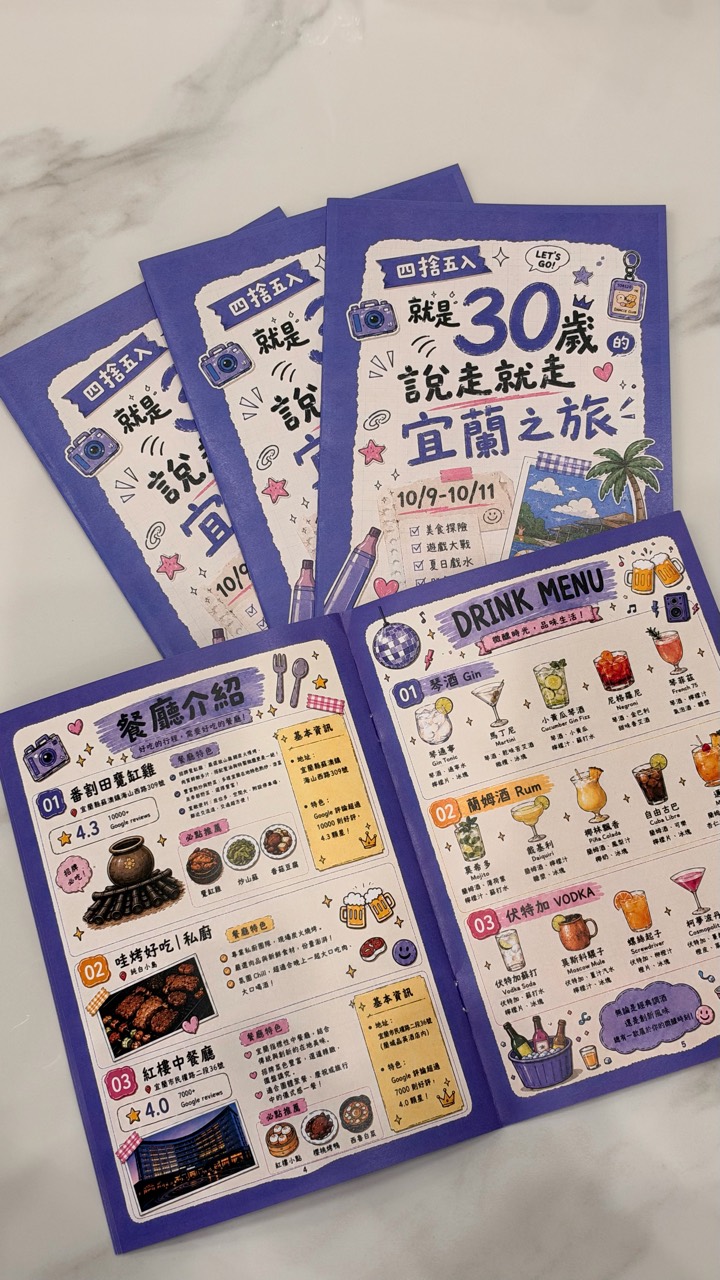
Next up: the resolution was too low for print. This time I used the open-source tool Upscayl with the remacri-4x model to upscale the images 4x, and batch-processed them with Python. That solved the resolution problem for the booklet.
Resolution sorted, and it still wasn't over. The final boss turned out to be color shift in print. From the text in the images to sharpness to printed color, every stage had its own problem to deal with.
Print shops and designers really know their stuff. Doing it myself showed me there are way more little details in printing than I ever imagined.
I wanted to make my friend a travel booklet as a small gesture that would mean something, and I ended up learning a lesson myself.
Generating images with AI is easy. Making something you can actually print is the hard part.