· 11 min read
Should I replace my hardware wallet? A checklist by where you bought it
Whether to replace a Ledger or Trezor after the 2026 implant cases depends on where you bought it: official advice and steps for each channel.
Whether to replace your hardware wallet depends on where you bought it. Since October 2026, Ledger and Trezor devices have been opened up and found to contain implants. If you bought from CryptoBilis, both companies advise moving to a new wallet with a new recovery phrase. Neither currently asks buyers from the official store or an authorized reseller to replace their device.
- From CryptoBilis: follow Ledger's and Trezor's official advice and move to a new wallet with a new recovery phrase.
- From a marketplace third-party seller, an auction, or second-hand: my advice is to treat it like a CryptoBilis unit: get a new device and generate a new recovery phrase.
- From the official store or an authorized reseller: check a few things when you unbox it, and contact official support if anything looks wrong.
On Taiwan's PTT DigiCurrency board, a thread about it filled up with the same worry: "I bought my Ledger from the official site and I'm nervous now," "who can guarantee the official site is fine," "bought it from the official site, but it could be swapped in transit," "ordinary people don't have the means to verify every step."
Facts are current as of November 3, 2026.
The tampered devices found so far
Each implant is an extra circuit board added inside a genuine device. During setup the screen shows the recovery phrase; the implant reads the words at that moment and sends them out over a cellular connection. On 10/13, Ledger published its Donjon team's findings: the implant does not modify the Secure Element or Ledger OS.
For the Ledger cases below, the original research source for where each device was bought and what was inside is Karpelès Lab (Mark Karpelès): the Ledger Implant OSINT report and the ledger_implant_osint GitHub repository. The Trezor case comes from Trezor's notice of 10/30.
| Channel | Device | Where |
|---|---|---|
| CryptoBilis | Two Ledger Stax, one Ledger Flex | Malaysia |
| CryptoBilis's Tokopedia store (bought August 2026) | Trezor Safe 5 (Trezor has not yet examined it) | Indonesia |
| Lazada sellers | Ledger Nano X | Thailand |
| Amazon Japan third-party seller (shipped from Malaysia) | Ledger Nano X | Japan |
| Yahoo! Flea Market (second-hand; the seller said it was originally bought on Amazon) | Ledger Nano X | Japan |
| MediaMarkt stores | Two Ledger Nano X | Europe |
| Ozon | Ledger Nano X | Russia |
| Metapod, Singapore airport | Ledger Flex | Singapore |
| Challenger, VivoCity | Ledger Flex | Singapore |
Three more Ledger devices with confirmed implants have no published purchase channel. As of 11/3, none of the devices with a known channel was bought from Ledger's or Trezor's official store. On 10/13 Ledger said it had not verified a drain linked to a device bought anywhere other than CryptoBilis.
What I did myself
- On the typhoon day off on 10/23, I opened up the Ledger Flex and Nano X I have at home to look inside.
- I turned the published teardown research into four interactive 3D teardown pages: Ledger Nano X, Ledger Flex, Ledger Stax and Trezor Safe 5. For the three Ledger pages, the original research source is Karpelès Lab (Mark Karpelès): the Ledger Implant OSINT report and the ledger_implant_osint GitHub repository. The Trezor Safe 5 page is based on Trezor's notice. The pages are in my own words and visuals; I have no official relationship with Karpelès Lab, and they have not endorsed them.
- For devices bought from marketplace third-party sellers, auctions or second-hand, my advice is to replace them: buy a new device from the official store or an authorized reseller and generate a new recovery phrase on it.
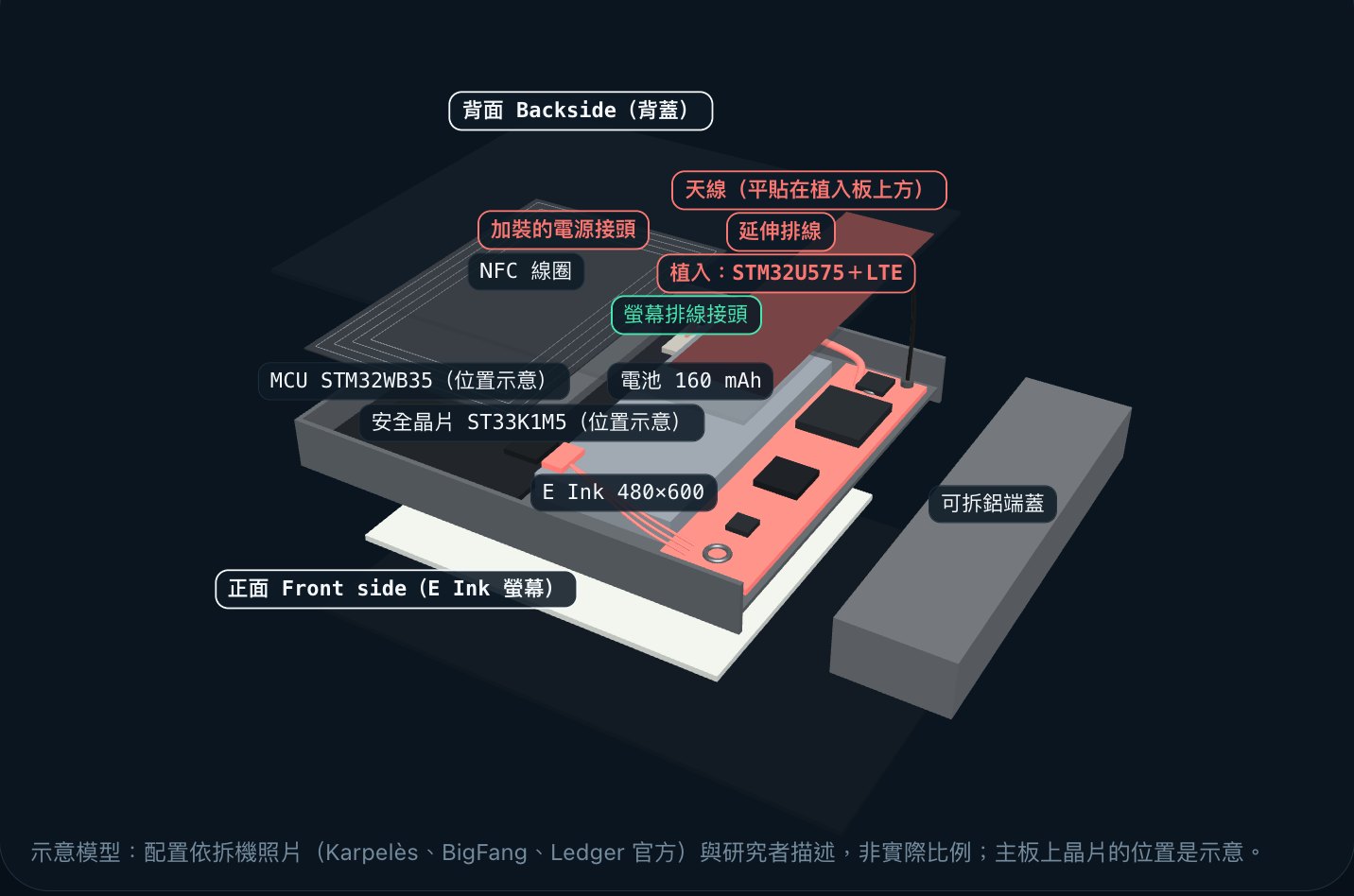
My 3D teardown model of the Flex: Flex implant teardown.
Why the authenticity check misses these implants
Ledger's threat model is explicit. The Genuine Check confirms that the Secure Element is Ledger's. As long as the original Secure Element is intact, it "cannot detect unauthorized physical modifications to the hardware, such as spying implants," and it "cannot verify the device's physical supply chain history." The implant only reads the screen and leaves the Secure Element alone, so the check still passes. Ledger also warns that tamper-evident seals are trivial to clone, and a package can be opened and closed again without damaging the seal.
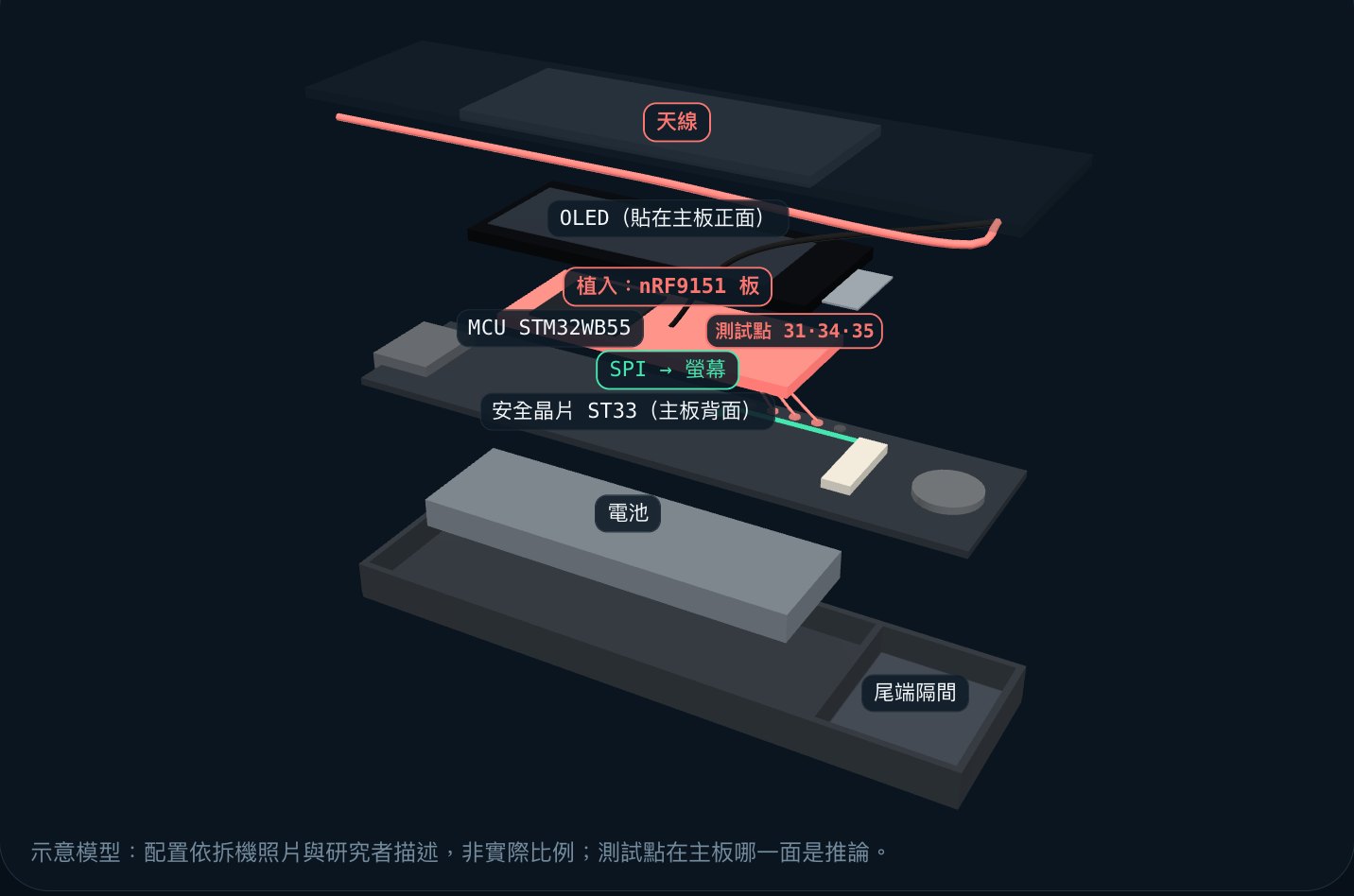
My 3D teardown model of the Nano X; you can rotate it and switch between the four versions: Nano X implant teardown.
Trezor's firmware authenticity check compares the firmware revision ID, and Safe-family devices also use their Secure Element to authenticate the device during first setup. Both are aimed at counterfeit devices and unofficial firmware. According to the report, the implant board only reads the screen. Trezor's advice to CryptoBilis buyers is to move to a new wallet; it does not say a passing check means you're fine.
The authenticity check cannot answer the "swapped in transit" worry, and Ledger says so itself. What you can do is inspect the package, generate the recovery phrase yourself, and ask official support when in doubt.
What to do, by where you bought it
Bought from the official store
No public case involves a device bought from an official store, and both companies' current advice is aimed only at CryptoBilis buyers. Trezor says a device bought from its official shop, its Amazon storefront or an authorized reseller "is most likely safe to use." Ledger says buying from Ledger or an authorized reseller is safer when combined with the Genuine Check. Still, check these when you unbox:
- Packaging: Ledger says that if the package appears opened, altered or compromised, don't use the device and contact Ledger Support immediately. Trezor also asks you to check first that the package is complete and hasn't been tampered with.
- Recovery phrase and PIN: Ledger says a genuine device "never comes with a recovery phrase or PIN code pre-configured." If the box contains a card with words already written on it, don't use that phrase and don't send funds to addresses it generates.
- Firmware: Trezor ships devices without firmware. If firmware is already installed, don't use the device.
- Generate the phrase yourself: let the device create it during setup, write it on paper, and never type it into an app on a computer or phone.
These checks only rule out known warning signs. No check can guarantee a device was never touched, and neither company's guidance claims one can.
Bought from an authorized reseller (a shop, or a brand's official marketplace store)
Being authorized is no guarantee. CryptoBilis itself was listed as an official Ledger reseller in Indonesia, Malaysia and the Philippines, and Trezor only removed it from its reseller list on 10/9. Four more devices in the list were bought in physical stores (two at MediaMarkt, one at Metapod, one at Challenger); whether those stores are authorized resellers has not been confirmed publicly.
Ledger's statement of 10/15 says it asked authorized resellers and distributors in Southeast Asia and Hong Kong to suspend sales, and reminded them that returned devices can never be resold in any form, even if they look new. It also set a new rule: Ledger products no longer go on shelves or displays, and stock stays in the back until the moment of purchase.
What to do:
- Check that your shop appears on Ledger's or Trezor's official reseller list.
- Run through the official-store checks above.
- If you bought in Southeast Asia or Hong Kong, or you're simply unsure, ask official support directly.
Bought from a marketplace third-party seller or an auction
Of the 11 Ledger devices in Karpelès Lab's list with a known purchase channel, four were bought on marketplaces or second-hand: Lazada, an Amazon Japan third-party seller, Yahoo! Flea Market and Ozon.
My advice is to treat these like CryptoBilis units: buy a new device from the official store or an authorized reseller, generate a new recovery phrase on it, move your funds over, and stop keeping funds on the old one.
I base this on three things:
- None of the devices in the list with a known channel was sold by an official store. Every one came from a reseller, a shop, a marketplace seller or the second-hand market.
- The Genuine Check "cannot detect" hardware modifications that leave the original Secure Element intact, and it cannot see what happened to the device after it left the factory. So you have no way to prove a device is clean yourself.
- Both companies tell you to buy only from official or authorized channels. Ledger's buying guide says buying from such unverified sources "introduces a number of supply chain vulnerabilities and security risks." Trezor says never to buy from an unauthorized third party, "as you can never tell who may have had access to it before you."
What it costs: the price of a new device, plus on-chain fees and time to move your funds. Trezor's replacement device or voucher applies only to CryptoBilis buyers. When you move funds, check the full receiving address, and watch for phishing from people posing as support. If you don't replace it, you're left relying on unboxing checks, and Trezor says there's no dependable way to inspect a device yourself.
If the listing's "Sold by" field shows the brand's official store, it belongs in the previous category.
Bought second-hand
You can't check whose hands a second-hand device passed through before yours. The Yahoo! Flea Market unit in the list was second-hand; the seller said it was originally bought on Amazon. Handle it the same way as a marketplace third-party purchase.
Bought from CryptoBilis
Ledger: on 10/9 Ledger advised users who bought from this reseller in the last 90 days not to start setup if they hadn't yet, and, if they had, to consider moving their assets to a new Ledger with a new recovery phrase. Its 10/13 update dropped the 90-day limit: if you haven't set it up, don't, and contact Ledger Support; if you have, move your assets promptly to a new device with a new recovery phrase; and don't enter or restore any recovery phrase on a device bought from CryptoBilis. If you lost funds or hold a tampered device, file a report with local police, and don't open the device or send it to anyone before speaking to Ledger Support or the police.
The two Stax units in Karpelès Lab's list were bought on 4/27 and the Flex on 5/22, all before the 90-day window in the 10/9 advice. If you bought more than 90 days ago, the 10/13 advice, which has no time limit, still applies to you.
Trezor: the advice covers every Trezor model bought from CryptoBilis from March 2026 onwards, including its Tokopedia store and any store selling devices it supplied. If you're already using it, move your funds to a new wallet with a new recovery phrase as soon as possible. If you haven't set it up, don't, and never enter your existing wallet backup on it. Keep the device and contact Trezor Support: you can get a new device or a voucher for one.
Why you can't reuse the old recovery phrase
The implant steals the recovery phrase itself. Once the phrase is out, an attacker can restore the same private keys on any wallet, so switching hardware changes nothing. Trezor says that using the wallet backup generated by the tampered wallet on another device "does not solve the issue." Ledger's advice is likewise a new device with a new phrase.
The steps:
- Buy a new device from the official store or an authorized reseller.
- Generate a new recovery phrase on the new device.
- Use the old wallet to send your assets to the new addresses. Trezor reminds you to check the full receiving address before sending.
- If no other secure hardware wallet is available yet, Trezor suggests moving funds temporarily to a software wallet or an exchange you're familiar with.
Buying safely next time
- Buy from the official store, or from a shop on the official reseller list. Trezor says its authorized resellers' stock is supplied by Trezor directly and kept separate from other goods.
- On marketplaces, choose the brand's official store and check who the seller actually is.
- Don't judge by the seal alone.
- When it arrives, check the packaging and look for a pre-set recovery phrase or PIN (for Trezor, pre-installed firmware). Generate the phrase yourself.
FAQ
Can I weigh it or open it up to check?
Trezor says weighing isn't a reliable test and there's no dependable way to inspect a device yourself. Ledger has a guide for inspecting the inside, but warns that opening a device can damage it, so back up your recovery phrase first. The weight on my Stax teardown page was measured by the buyer, @wentrre: he put all the parts of his opened CryptoBilis Stax on a scale and got 49.0 g, against Ledger's published 44.2 g. That's one unit, taken apart; it's not a test you can use.
Will support ask for my recovery phrase?
No. Ledger says it will never call you, message you directly or ask for your recovery phrase. Trezor says its support will never ask for your wallet backup, and warns that scammers will likely use this incident for phishing through fake emails, physical letters and phone calls. If funds have already been stolen, contact official support and your local police.
Are there implants in Trezor devices too?
On 10/28 Trezor received a report of an implant in a Safe 5 bought from CryptoBilis via Tokopedia in August 2026. When it published its notice on 10/30, Trezor did not yet have the device in hand, but it was treating the report as credible. As of that notice, no CryptoBilis buyer had reported a loss of funds to Trezor.
This is security guidance, not investment advice.